Wednesday, 20 November 2013

How to play background music in corona SDK application

This is a simple tutorial, which will teach you how to play background music in your corona SDK applications. 

First, load the music as:
  local backgroundMusic = audio.loadStream("bgMusic.mp3") 

Then you can play the music in loop as:

  local backgroundMusicChannel = audio.play( backgroundMusic, { channel=1,
                                                                                                              loop    s=-1,   
                                                                                                              fadein   =5000 })


where, channel is an integer value representing the music channel (0-32)

And if you want to stop the music, you can use:
  audio.stop( backgroundMusicChannel )

Tuesday, 5 November 2013

How to Install cocos2d in Xcode

Cocos2d is a powerful game engine, that can be added inside Xcode. It's installation steps are as simple as below:


  • Keep the downloaded file in your desktop.
  • Open terminal and type cd
  • Drag your latest version of cocos2d package into the terminal window.
  • Type sudo and open the cocos2d package, and drag the 'install-templates.sh' file into your terminal window. Then press 'Enter'.
  • Put your administrator password to install templates.
Now open your Xcode and see that the cocos2d has been successfully integrated. That's all...


How to hide status bar in iOS7

This post is about the UIStatusBar issue with the iOS 7, Xcode based applications. In your latest application, you can hide the UIStatusBar on application launch by selecting the Hide during application launch property as below:


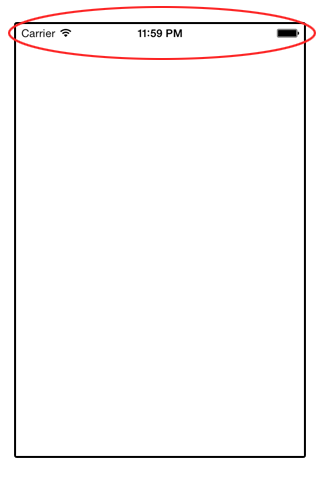
But this isn't enough for hiding the ststusbar inside the app. That is, inside your iOS 7 app, you may see the status bar as it is:


For solving this, just do the following:
  • Open your info.plist
  • Add a row and name it as : View controller-based status bar appearance and set it to NO


That is: 

<key>UIStatusBarHidden</key>
<true/>
<key>UIViewControllerBasedStatusBarAppearance</key>
<false/>

We also attaching sample screenshot for your information:


Monday, 28 October 2013

How to fill a rectangle with gradient in corona SDK

Corona has a property called graphics.newGradient(), which will be useful for coloring/filling your rectangle with suitable color gradient.


-- First create the rectangle --
local myRectangle = display.newRect( 0, 0, 200, 200 )


-- Then create the gradient method --
local g = graphics.newGradient(
                            { 255, 255, 255 },     -- This is the first color array
                            { 200, 200, 200 },     -- This is the second color array
                             "down" )                  --[[ This is the gradient direction.
                                                                    Default is "down"
                                                                    Others are "up","right" and "left". --]]


-- Now fill your rectangle with the created gradient as: --
myRectangle:setFillColor( g )


How to check whether the testing device supports vibration facility in corona SDK

You may need to implement vibration feedbacks in many of your applications, especially in games and during warning alerts. In this chapter, you will learn about the a boolean key event to check whether your device supports vibrational feedback for your corona app. If this key event returns true,then your device will support vibration feedbacks, and if it returns false, then your device won't.


--  Function to trigger key event --
local function onKeyEvent( event )
    -- Vibrate the gamepad if its 'A' button was pressed.
    if (event.keyName == "button_A") and (event.phase == "down") then
        if event.device and event.device.canVibrate then
            event.device:vibrate()
        end
    end
end

Runtime:addEventListener( "key", onKeyEvent )


Note: This will not work with Android versions <= 4.0.

Saturday, 26 October 2013

How to repeat 2 backgrounds continuously forever in corona SDK game

In this tutorial, we will learn about how to repeat 2 backgrounds forever in our corona SDK game application. The code is as follows:

  
  -- Creating 2 images to run as background --

  local bg1 = display.newImageRect( "bg_1.png" ,480 ,320)
  bg1.x = display.contentWidth/2; bg1.y = display.contentHeight/2

  local bg2 = display.newImageRect( "bg_2.png" ,480 ,320 )
  bg2.x = bg1.x + bg1.width; bg2.y = display.contentHeight/2


-- Declaring a local variable to determine the movement speed --
  local speed = 30


-- Move Function --

  function move()
      bg1.x = bg1.x-speed;
      bg2.x = bg2.x-speed;

      if(bg1.x + bg1.width/2 < 0)then
        bg1.x = bg1.width*3/2-speed
      elseif(bg2.x + bg2.width/2 < 0)then
        bg2.x = bg2.width*3/2-speed
      end
  end
  Runtime:addEventListener( "enterFrame", move )


How to split complex strings in corona SDK

This session will teach you about splitting complex string of data separated with some characters. Lets assume that you have a string as House;home,40|Bed,20|Mirror,10. Now we will show you how to split each word and assigning each to a table.


  local myString = "House;home,40|Bed,20|Mirror,10"
  local myTable = {}
  for word in string.gmatch(myString, '([^,|]+)') do
     -- 'myTable' contains the data you need
    myTable[#myTable+1]=word print( myTable[#myTable] )
   end


Hence you will get the items as each table elements, as:
  
  myTable[1] = House
  myTable[2] = home
  myTable[3] = 40
  myTable[4] = Bed
  myTable[5] = 20
  myTable[6] = Mirror
  myTable[7] = 10